Try with your file
Drop your bank statement (PDF)
1 file · 100 pages max · Free preview of 2 pages
1 file selected
Save hours every week
Turn your bank statements (PDF) into Excel, CSV or OFX, without manual retyping.
Drop a PDF statement and watch the extraction happen live. Instant preview, no signup required.
To convert an osteopathy practice’s bank statements to Excel or CSV, use a native bank export if available. Otherwise extract the PDF, verify the transaction rows and balances, then add settlement, clinic and evidence references. The result is a reviewable cash schedule; booking records, processor reports and invoices explain what the cash represents.
This guide is for a self-employed manual-therapy osteopath running a private-pay practice, with UK registration examples. It does not describe US osteopathic-physician billing or determine tax treatment in other countries. Adapt the evidence schedule to your own practice structure and local rules.
The bookkeeping reality of a self-employed osteopath
Whether you rent a room in a multidisciplinary clinic, run your own practice, do home visits, or work across two or three locations, you are effectively a small business of one. That comes with a short but non-negotiable list of duties.
- Separate business and personal money. Even one dedicated account or card for patient income and practice spending makes every later step far easier. A mixed account requires a personal-versus-practice review for each uncertain row.
- Track clinic receipts and cost evidence. Patient and clinic-share deposits sit beside room, equipment, CPD, registration, cover, and travel payments; bookings, agreements, and policies supply the missing context.
- Keep a clinic tax-reserve view. Base it on reviewed patient and clinic receipts, then update dates and assumptions from the current rules for the country and practice structure.
- Preserve clinic and regulator evidence. Retain statements and exports with settlement batches, room agreements, cover policies, CPD records, and renewal documents for their applicable periods.
Tax registration, digital-record requirements, and expense treatment vary by jurisdiction. Treat this spreadsheet as a working ledger, not a filing method or a decision that every clinic-related payment is deductible. Mark mixed-use costs for review and apply the current official guidance for the country in which you practise.
The useful work is connecting clinic cash movements to bookings, room arrangements, and professional evidence. Extracted rows provide that index; they do not replace those records.
What Excel and CSV add to the original statement
An osteopathy account PDF is designed to display patient settlements and clinic payments, not to reconcile them by booking batch or cover period. Its text sits at page coordinates instead of in reusable transaction cells. That is why:
- Clinic descriptors fragment. A processor or room-hire reference can wrap away from the related amount.
- You cannot sort or filter. You cannot pull “all CPD payments” or “everything above £100” out of a PDF.
- Settlement checks remain visual. The PDF cannot group card batches, room periods, or renewal evidence without re-entry.
- The next system needs reviewed rows. A file can be imported separately where supported, but BankStatementLab does not post directly to the destination.
Once the rows are reviewed, an osteopath can match card batches, distinguish room arrangements, and locate regulator or cover payments quickly. CSV or XLSX remains a separate file import if the destination supports it; the clinic evidence still determines what each row represents.
Here is the same information, before and after.
| Osteopathy record in the PDF | Osteopathy review after extraction |
|---|---|
| Card settlements are buried among clinic payments | Filter settlements and attach the processor batch |
| Room rent and clinic-share deductions lack context | Add clinic, period, and agreement references |
| GOsC, indemnity, and CPD payments appear months apart | Group renewal evidence without declaring each item allowable |
| Home-visit travel looks like any other journey | Link the bank row to a mileage or appointment record |
| Statement balances sit outside the clinic schedule | Reconcile extracted rows to the source closing balance |
The conversion guide for bank-statement PDFs explains the available extraction routes. Apply an osteopathy-specific acceptance check: trace one patient-settlement batch, one room or cover payment, and the closing balance before building clinic categories.
The step-by-step method for an osteopath
Here is the workflow from PDF statements to a reviewable clinic ledger. Work in order and keep regulator, cover, room-rental, and patient-payment evidence attached to their rows.
1. Gather every statement
Download the statements spanning the clinic’s reporting period, ideally from the account receiving patient settlements. If practice and personal activity are mixed, include the relevant pages and label personal rows. Confirm the month sequence and balance roll-forward; keep any missing statement visible as an unresolved evidence gap.
2. Convert the PDFs to Excel or CSV
Choose a month containing a card settlement, clinic-room payment, and regulator or insurer charge. After extraction, compare their full descriptions, signs, dates, and the account’s closing balance with the PDF. The transaction rows provide a review surface; they do not identify the patient batch, policy period, or clinic agreement without supporting records.
BankStatementLab can prepare XLSX or CSV for this review; it does not post transactions into your clinic ledger or determine their tax treatment. Inspect all extracted tables before export and add clinic or booking-batch references yourself. Source files and extracted results have separate retention schedules, so check the privacy policy and deletion settings before upload. See pricing for current page-based costs.
Patient names in transfer descriptions may reveal a treatment relationship. Keep booking details and clinical notes in the practice’s approved systems. Share only the bank information necessary for the task and review your data-protection obligations before using an external converter. A patient ID substituted for a name does not automatically make the file anonymous.
3. Categorize: patient receipts and clinic cost candidates
Add a Category column and tag every row. For a self-employed osteopath the buckets usually look like this.
| Review label | Typical osteopath transactions | Supporting record or check |
|---|---|---|
| Patient and clinic receipts | Card, cash, transfer, clinic-share payouts | Booking report, cash log, or clinic remittance |
| Clinic room / premises | Room rental, clinic share, rates, utilities | Hire agreement, covered period, and payer responsibility |
| Equipment & supplies | Treatment couch, couch roll, consumables, small kit | Invoice plus capital or mixed-use review where relevant |
| CPD & registration | GOsC or AHPRA registration, CPD, professional-body fees | Renewal and course evidence; local tax treatment still required |
| Insurance & admin | Indemnity, phone, booking or notes software | Policy period, named insured, and business-use allocation |
| Travel candidates | Fuel, parking, tolls for home visits | Appointment or mileage log and local journey rules |
For travel, keep the clinic or home-visit appointment, route, mileage, reimbursement, and method required under the current rules; jurisdictions can distinguish ordinary commuting from business journeys differently. For training, separate regulator-mandated CPD from a course that adds a new discipline and keep the syllabus and renewal evidence. Those facts let the relevant rule be applied without turning the bank category into a deduction decision.
Sort recurring clinic, processor, regulator, training, and insurer descriptors into review groups. A payment to the same clinic can represent room hire, a patient-fee split, or another adjustment, so confirm the agreement before applying one label to the batch. The pivot-table transaction guide helps surface repetition without making that decision for you.
Keep an osteopathy compliance-cost register
For UK practice, separate recurring regulator and cover payments from ordinary clinic overhead. The General Osteopathic Council explains that practising osteopaths need appropriate professional indemnity arrangements and should also check the cover for their place of work in its official indemnity guidance. Add renewal type, policy or registration period, statement date, payee, evidence location, and person responsible columns. The final field matters when room hire includes clinic-level cover that you did not purchase yourself.
This register is evidence management, not a tax verdict. Keep it beside the broader accountant handoff workflow, and confirm the treatment of each payment for your jurisdiction.
4. Reconcile
Reconcile the extracted rows to the bank balances, then match each card deposit to its processor settlement. Keep gross receipts, fees, other adjustments, and the net deposit in separate fields and leave unexplained batches open. The reconciliation proves how cash moved; the current rules still determine the treatment of each component.
5. File it yourself or hand it to an accountant
Once patient settlements, clinic deductions, and the closing balance agree, prepare separate schedules for receipts, room arrangements, cover, training, equipment, and travel candidates. Those schedules still need the rules for the country and practice structure applied to them; use the current instructions or send the workbook with its agreements and evidence to an accountant.
Decide who prepares and reviews the clinic records
You do not have to choose all-or-nothing. You can prepare the cash schedule yourself and agree with an accountant who reviews classification and filing.
- Osteopath-led preparation may suit one clinic and a simple patient-payment flow, provided room arrangements, cover, and local filing rules are documented.
- Accountant-led preparation can help where clinic shares, equipment, mixed-use costs, or work across jurisdictions require judgment. Agree the evidence list and fee before sending files.
- Shared preparation leaves settlement and renewal reconciliation with you while the adviser decides the filing treatment. A reviewed workbook helps only to the extent the engagement uses it.
A reviewed spreadsheet can make clinic and compliance-cost questions easier to locate, but any fee or time reduction depends on the accountant’s engagement. Ask whether they want room-rental, cover, registration, and CPD evidence in separate columns. The guide to preparing bank statements for an accountant provides a handoff checklist.
A worked example: one month of an osteopath’s statement
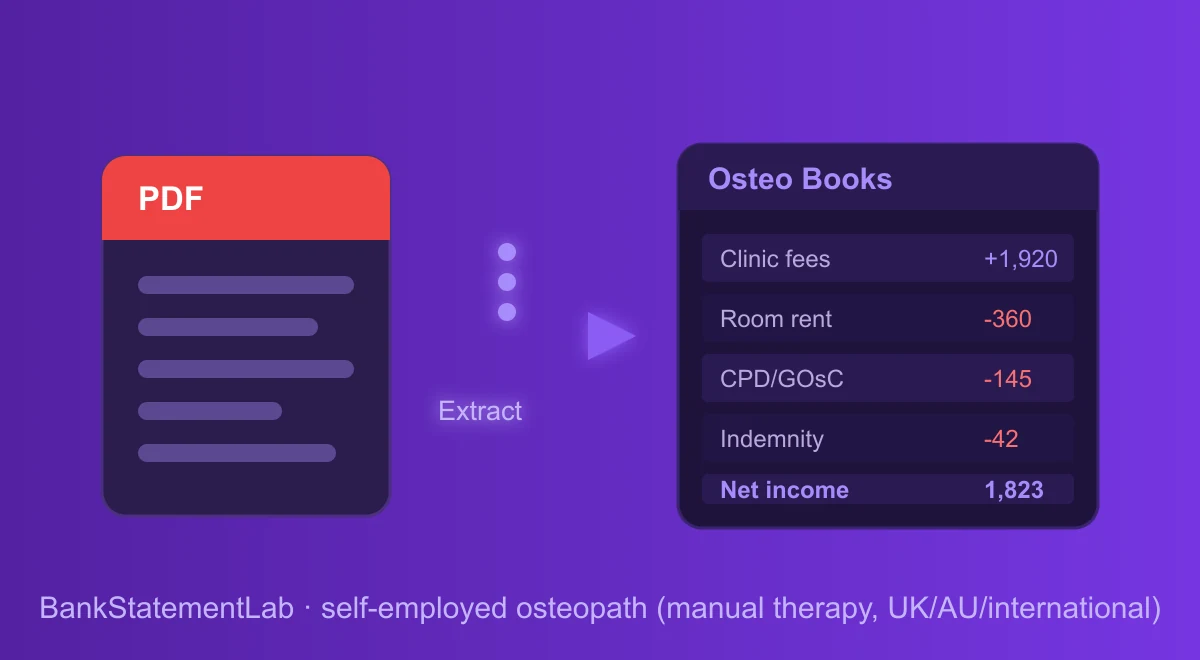
This fictional cash schedule uses one currency. The 1,920.00 card deposit is a net bank receipt, and any processor fees must be checked against a separate settlement report. Categories below are review labels added after extraction, not a guaranteed export layout.
| Date | Description | Amount | Category |
|---|---|---|---|
| Mar 03 | Patient fees — card takings | +1,920.00 | Bank receipt — review |
| Mar 06 | Clinic room rental | -360.00 | Clinic room / premises |
| Mar 10 | Fuel — home visits | -58.40 | Vehicle / mileage |
| Mar 13 | CPD course | -145.00 | CPD & registration |
| Mar 17 | Indemnity insurance | -42.00 | Insurance & admin |
| Mar 20 | Transfer to personal account | -700.00 | Personal (exclude) |
| Mar 24 | Couch roll & consumables | -31.60 | Equipment & supplies |
| Mar 28 | Patient fees — bank transfers | +540.00 | Bank receipt — review |
In this illustrative ledger, the categories show bank receipts of 2,460.00 and candidate business costs of 637.00. The 700.00 paid to the owner is recorded as an owner movement and stays outside the receipts-and-costs subtotal. The subtotal is 1,823.00, while the account’s net cash movement after the owner payment is 1,123.00. Neither figure establishes gross patient revenue or taxable profit; the current rules still determine the treatment of clinic, travel, training, cover, and equipment costs.
Common mistakes and traps to avoid
Even careful osteopaths trip on the same few things.
- Treating manual entry as self-validating. A typed card settlement is a second copy that still needs comparison with the source statement.
- Mixing personal and business. If personal spending sits next to an indemnity renewal, every category needs more review. A separate account or dedicated card reduces that ambiguity. See how to separate personal and business expenses.
- Forgetting cash and card takings. Bank transfers are the easy part; make sure cash payments and card-machine payouts are all captured. Use booking and cash records to check receipts that never reached this bank account.
- Deciding travel from the destination label. A fixed-clinic journey and a home visit may be treated differently, but work base, route, jurisdiction, year, and reimbursement matter. Preserve the mileage and appointment evidence for the current rule.
- Guessing at deductions. Keep invoices, business-purpose records and any allocation needed under your local rules; the bank statement alone does not prove a deduction. When unsure whether something qualifies, check the current rules or ask your accountant rather than inventing a rule.
- Relying on a clinic total before sampling. Compare a patient settlement, room payment, cover or renewal line, and closing balance with the PDF.
- Overlooking retention of osteopathy account data. Check how both sources and results are deleted before uploading statements that reveal clinic locations and patient-payment patterns.
Going further: build a system, not a scramble
Review the osteopathy ledger after each card-settlement or room-rental cycle, while clinic evidence is still close at hand.
- Review each clinic settlement period. Match patient-payment settlements and room charges, then update the separate regulator-and-cover register.
- Maintain a clinic workbook with source provenance. Use the batch-statement method while retaining account, month, clinic, and processor fields.
- Watch cash flow. Use the reviewed cash history alongside upcoming room costs, bills and expected bookings; a running total alone is not a forecast.
- Set aside tax as you go. Update a provisional reserve with your accountant using the applicable tax basis and payment schedule.
- Review overlooked osteopathy cost candidates. The statement checklist can prompt questions about registration, CPD, cover, and couch supplies; confirm each under the applicable rule.
For a private-pay osteopath, card settlements can seed the receipt ledger even when no invoice is issued for each visit. The bank feed still omits cash, patient-level bookings, processor components, clinic agreements, and mileage purpose. The accountant handoff guide explains how to document those limitations.
Three ways to convert a statement, compared
For this clinic example, judge each route by its handling of a card batch, room payment, professional renewal, and balance reconciliation—not by the first visible subtotal.
| Route | Clinic-payment workflow | Osteopathy control | Result |
|---|---|---|---|
| Manual entry | Type each patient settlement and clinic cost | Recheck signs, dates, and every balance | A tailored sheet with transcription risk |
| General table extraction | Recover visible tables, then reconstruct columns | Inspect wrapped clinic and processor descriptions | A spreadsheet table that may need cleanup |
| Bank-statement extraction | Extract rows and review the structured output | Match settlement, room, and renewal examples to evidence | XLSX, JSON, or CSV; no live software link |
Whichever route you choose, compare the export with the statement before trusting totals. Sample a card-settlement deposit, clinic-room payment, and cover renewal, then make sure the regulator-cost register identifies who was responsible for the cover.
Prepare the clinic handoff
Your statements show patient receipts and clinic payments, while the compliance register and invoices explain them. Convert and reconcile the PDFs, then deliver the reviewed CSV or XLSX with the evidence needed to assess room, cover, training, equipment, and travel costs.
Use automation for the statement rows, then spend the professional review on clinic, cover, and renewal evidence.
Compare bank movements with your books
For the clinic’s bank-account review, BankStatementLab reconciliation compares processed statements with an accounting export and proposes pairs to approve. The Excel, CSV or PDF report retains unmatched items. Use the processor’s settlement records to explain card batches; the report does not reconstruct individual appointments from a net payout.
Frequently asked questions
How long do I need to keep my bank statements as a self-employed osteopath?
The period depends on the country, tax return, and professional rules that apply to the practice. Check the current official guidance and keep the original statement, reviewed export, and supporting clinic records together. The record-retention guide for self-employed workers explains the file structure without hard-coding a deadline here.
Do I legally need a separate bank account for my osteopathy practice?
Whether you need a dedicated account depends on your legal form, jurisdiction and bank terms. A separate account can simplify records, but a personal account may prohibit business use. If the activity is already mixed, flag personal rows and reconcile patient or clinic receipts and practice costs to the relevant records. This separation guide shows the review workflow.
Can I claim my GOsC (or AHPRA) registration, CPD, and indemnity insurance as expenses?
Keep regulator fees, professional cover, CPD, and association membership in separate evidence groups. Country, year, practice entity, reimbursement, first registration versus renewal, and the purpose of training can change the treatment. Retain the renewal, policy, course, and bank records, then apply the current official rule to each item.
How do I record card takings when the payout is net of a processor fee?
Keep the extracted bank deposit as the net amount received, then use the processor settlement to add gross receipts, fees, adjustments, and net fields. Do not reverse-engineer missing components from the deposit. After the batch reconciles, apply the current rules for the jurisdiction and practice structure to the separate receipt and cost candidates.
Is the drive to my clinic a deductible business mile?
The result depends on the journey, work base, country, year, and vehicle method. Record origin, destination, patient or clinic purpose, mileage, and reimbursement rather than deciding from a fuel payment. Use the current local rules to distinguish commuting, home visits, and travel between clinics and to determine which vehicle costs may be combined.
My statements come from two different banks — can I still build one clean file?
Yes. Review each account separately, then map its columns into a working table with account, currency and source-period fields. Preserve separate debit/credit fields or convert them to a documented signed-amount convention. Different statements can produce different tables; do not assume a uniform schema or merge accounts solely because their column headings match. Match transfers between accounts included in the workbook so they do not become patient income. See the batch-statement workflow.
Related articles
- Keep Books When Patient Invoices Are Not the Primary Record
- Separate Personal and Osteopathy-Practice Rows
- Batch Multiple Clinic Statement PDFs Into One Workbook
Extract osteopathy-practice statements to XLSX, JSON, or CSV with BankStatementLab
Save hours every week
Go from PDF to an Excel file ready to use, with no manual data entry.