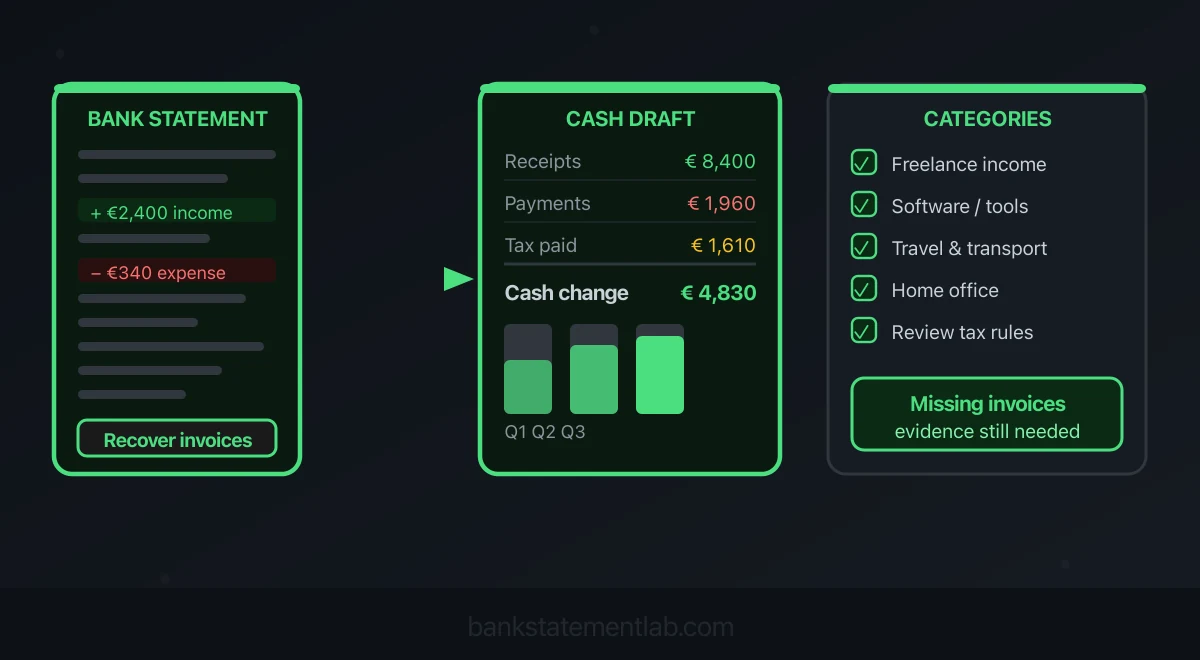
Save hours every week
Turn your bank statements (PDF) into Excel, CSV or OFX, without manual retyping.
If invoices or receipts are missing, bank statements are a useful starting point for reconstructing books, but they are not a complete substitute for source documents. A statement can prove that money moved; it may not prove what was sold, the business purpose of a purchase, the gross amount before platform fees, or the correct tax treatment. The IRS expressly warns that proof of payment alone does not establish a deduction, while HMRC lists bank statements alongside invoices, receipts, till rolls and other records—not instead of them. This guide shows how to build a provisional transaction ledger, identify the evidence gaps and hand a reconciled package to an accountant or tax adviser.

What bank-statement-only bookkeeping can—and cannot—do
Bank data is good at establishing dates, paid amounts, counterparties and cash balances. It is weak at establishing business purpose, invoice tax, accruals, unpaid invoices, cash transactions and gross sales when a platform pays out net of fees. The IRS recordkeeping guide permits a system suited to the business, but says supporting documents should show both the amount paid and that it was a business expense. HMRC’s self-employed record guidance likewise expects records of sales, income and expenses, with bank statements among several forms of proof.
That said, bank-statement-only bookkeeping has real trade-offs. Here is an honest comparison:
| Criteria | Full Invoice System | Bank-Statement-Only Bookkeeping |
|---|---|---|
| Setup effort | Depends on the system and records | Must gather all accounts and recover evidence |
| Detail level | High (client, project, line items) | Medium (transactions only) |
| Tax support | Strong when complete and reconciled | Provisional until evidence gaps are resolved |
| Audit response | Clear source trail | Higher risk of follow-up questions |
| Time to produce P&L | Depends on complete records and review | Depends on unresolved transactions and accounting adjustments |
| Purpose | Ongoing bookkeeping with supporting evidence | Temporary reconstruction when documents are missing |
| Cost | Varies by process and software | Time to reconstruct and verify |
For a simple cash-based business, the statement can therefore produce a useful first-pass ledger. Treat it as reconstruction work, not permission to invent missing facts or discard the requirement to keep invoices and receipts where the rules require them.
What You Can Reconstruct From a Bank Statement Alone
A bank statement contains more useful financial information than most people realize. Every line is a data point. Before you feel overwhelmed, here is what each field actually tells you from a bookkeeping perspective:
| Bank Statement Field | What It Tells You | Bookkeeping Use |
|---|---|---|
| Date | Posting, transaction or value date as labelled | Trace timing; tax recognition can differ from bank posting |
| Description / Narrative | Who paid you or who you paid | Category inference (client name, software vendor, utility) |
| Credit amount (in) | Money credited | Investigate income, transfers, loans and refunds |
| Debit amount (out) | Money debited | Investigate expenses, assets, transfers and liabilities |
| Running balance | Balance at the statement point shown | Reconciliation, not necessarily available funds |
| Reference number | Payment reference or invoice number | Matching transactions to clients (even without stored invoices) |
| Transaction type | Transfer, direct debit, card payment, etc. | Distinguishing real income from internal transfers |
From these fields you can identify likely income, outflows and transfers and calculate a cash-based draft profit and loss. You still need to reconcile net platform payouts, reversals, loans, owner contributions, taxes, assets and any unpaid or cash transactions required by your accounting basis.
Crucially, a merchant name does not establish business purpose. Recover invoices from suppliers and clients, payment-processor reports, email confirmations, contracts and contemporaneous logs wherever possible. Memory or a new note can explain a lead, but it is weaker than evidence created when the transaction occurred.
Step-by-Step: How to Do Bookkeeping From Bank Statements Only
These five steps produce a reviewable reconstruction. Whether it is sufficient for a return depends on the jurisdiction, accounting basis and evidence you can recover.
Step 1 — Gather All Your Bank Statements
Download all statements for the financial year from your online banking portal. Export them as PDF, CSV, or both. If you run your business from a personal account (not ideal, but very common), download those too — you will filter out the personal transactions later.
Cover the full accounting period using the bank’s actual statement cycles, including any opening or closing partial period. Include card and payment-processor records where used; do not assume twelve files prove full coverage.
Step 2 — Extract and Structure Your Transactions
Once you have your statements, you need them in a spreadsheet format. If your bank offers a CSV export directly, use it. If you only have PDFs, convert them to Excel or CSV using a tool built for that purpose — manually copying hundreds of transactions is error-prone and time-consuming.
Once you have a structured file, your columns should look like this: Date, Description, Amount In (credits), Amount Out (debits). If your export gives you a single “Amount” column with positives and negatives, split it into two columns for clarity.
Step 3 — Mark Personal, Transfer and Tax Transactions
Keep a complete source ledger for reconciliation. Add a classification and exclude the appropriate rows only from operating totals:
- Internal transfers: money moved between your own accounts (savings, current, business) — these are not income or expenses
- Personal transactions: groceries, personal subscriptions and personal travel need separate treatment; on a business account they may be drawings, contributions or amounts due to the owner
- Tax payments and refunds: distinguish personal income tax, recoverable VAT or sales tax, and business taxes; their accounting treatment differs
What remains after this filtering step is your raw business transaction list.
Step 4 — Categorize Every Remaining Transaction
Assign a provisional category, then verify business purpose and the applicable tax rules. These examples assume a qualifying business transaction; a bank description alone does not establish that it qualifies:
| Transaction Example | Category | P&L Impact |
|---|---|---|
| Client payment — John Ltd | Freelance Income | + Revenue |
| Platform payout — design marketplace | Clearing / payout review | Reconcile gross sales, fees, refunds and timing |
| Adobe Creative Cloud subscription | Software & Subscriptions | − Expense |
| MacBook purchase | Equipment | − Expense (or capital) |
| Home office proportion of rent | Home Office | − Expense |
| Accountant fee | Professional Fees | − Expense |
| Train ticket for client meeting | Travel | − Expense |
| Personal income-tax payment to HMRC / IRS | Tax Payment | Excluded from P&L |
| Transfer to savings account | Internal Transfer | Excluded from operating P&L; retained in reconciliation |
| Refund from a supplier | Contra-Expense | − Reduces expense total |
For transactions whose description is ambiguous, cross-reference with your email inbox or calendar. A hardware-store payment during an office setup is a lead, not proof of business use. Recover the receipt and document the actual purchase in a “Notes” column; flag unresolved evidence.
Step 5 — Build Your Profit and Loss Statement
With your categorized transactions, building a P&L is straightforward:
- Sum all income categories → Total Revenue
- Sum all expense categories → Total Expenses
- Subtract: Total Revenue − Total Expenses = Net Profit (or Loss)
Group the draft totals by category, then reconcile them to opening and closing balances and the original statements. Mark uncertain items, assets, taxes and owner transactions for review instead of forcing them into operating expenses. A spreadsheet total is not by itself a tax conclusion; the final treatment depends on your evidence and accounting rules.
Need a workable transaction ledger? BankStatementLab extracts statement rows to Excel, CSV or JSON. Unlock protected PDFs before upload, then compare every extracted table with all original pages. A matching balance alone does not prove completeness. Add categories and supporting-document references after that review. Get started →
Common Mistakes When Bookkeeping Without Invoices
Reconstruction is provisional until the evidence and classification checks are complete. Pay particular attention to these errors:
Counting transfers as income. If you move £2,000 from your business account to your personal account, that is a transfer — not income. Recording it as revenue inflates your profits and increases your tax bill. Identify transfers, retain both sides in reconciliation, and exclude them from operating income and expenses.
Missing platform fees deducted at source. Many marketplaces and payment processors deduct their commission before paying you. Your bank statement shows only the net amount. If a platform charged a 20% fee on a £1,000 project and paid you £800, your income was actually £1,000 and your platform fee was a £200 expense. Check your platform dashboards to reconstruct the gross figures.
Ignoring quarterly or estimated tax payments. In the US, self-employed individuals may need estimated tax payments, depending on their circumstances. In the UK, sole traders pay tax through self-assessment. These outflows appear on your bank statement as debits — but they are not business expenses. Keep them in a separate “Tax Payments” category and do not include them in your operating expense total.
Mixing the tax year boundary. A payment that hits your account on 1 April might relate to work done in March. Under a cash basis, recognition generally follows receipt and payment, but posting dates, card payments and cheques can require separate analysis under local rules. Under an accrual basis, unpaid income and expenses also matter. Use the applicable tax-year boundary and accounting method rather than sorting solely by bank date.
Losing context on ambiguous transactions. Bank descriptions like “FASTER PAYMENT REF 001234” or “CARD PAYMENT — AMAZON” tell you almost nothing on their own. Build the habit of noting the purpose of unusual transactions in a separate notes column while the context is fresh. Six months later, you will not remember whether that Amazon charge was a business book or a birthday present.
When to Upgrade Beyond Bank-Statement-Only Bookkeeping
Move from reconstruction to an ongoing evidence-based process as soon as possible. Additional support becomes especially useful when:
- You are VAT-registered (UK) or collecting sales tax (US). Tax authorities require a more granular audit trail that bank statements alone cannot always provide. Determine the required invoices and supporting records under the applicable tax rules.
- You have multiple income streams that need separate tracking. If you earn from client work, product sales, affiliate income, and a rental property, a single-spreadsheet approach becomes unwieldy fast.
- You are growing a team. Payroll, worker status, reporting and deductions introduce additional records and controls; software alone does not decide worker status.
- You need to raise finance or apply for a mortgage. Ask the lender or investor which financial statements and source evidence it accepts; a software-generated report is not automatically verified.
- Reconstruction is repeatedly taking substantial time. Compare the cost of software and review support with your actual time and error rate.
If any of these apply to you, consider moving to a simple cloud accounting tool. Even at an entry-level tier, dedicated software automates much of the categorization, connects directly to your bank feed, and produces reports from the records you provide. Accuracy and statutory suitability still depend on setup, evidence and review.
Compare bank movements with your books
Once a provisional ledger exists, compare its bank entries with processed statements using the BankStatementLab reconciliation report. Review suggested pairs and export matched and unmatched items as Excel, CSV or PDF. This documents the comparison but does not supply a missing invoice or establish the business purpose of a payment.
Conclusion
Bank statements can rescue a disorganized ledger, but they do not turn missing invoices into complete documentation. The defensible workflow is systematic: gather every relevant account, extract and validate the transactions, reconcile transfers and net payouts, recover source documents, record uncertainties and have the tax treatment reviewed where necessary.
BankStatementLab can remove the retyping step by producing a structured spreadsheet from a statement PDF. It does not decide whether an item is taxable, deductible or adequately evidenced; that remains part of the bookkeeping review.
Ready to turn your bank statements into proper books? Get started on BankStatementLab →
Related Articles
Save hours every week
Turn your bank statements (PDF) into Excel, CSV or OFX, without manual retyping.