Save hours every week
Turn your bank statements (PDF) into Excel, CSV or OFX, without manual retyping.
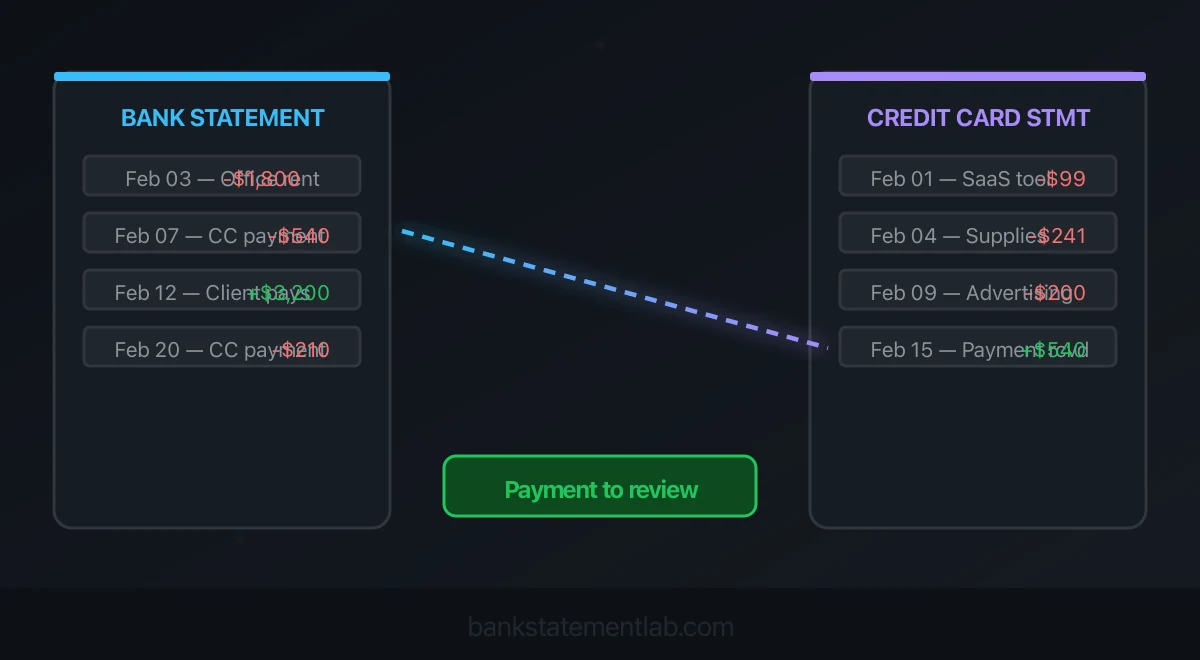
Credit card reconciliation has two jobs: compare card purchases, fees, credits and payments with the card ledger, then match payments to the cash leaving your bank account. A card purchase and the later payment to the issuer are separate events. Recording both as expenses counts the spending twice.
BankStatementLab can compare the bank outflow with its bank-account ledger entry, propose a match and keep unresolved entries visible. Review and validate the proposals, then export Excel, CSV or PDF. Use the issuer’s statement and the card ledger for the separate purchase-and-liability check; paying the issuer does not prove that every card purchase is correct.
Find card payments in your bank statement with BankStatementLab. Review the current plans and pricing.
Explore bank reconciliation in BankStatementLab: report preview, supported formats and review workflow.
Credit card reconciliation versus bank reconciliation
| Check | Records to compare | What it proves |
|---|---|---|
| Card account reconciliation | Card statement and card ledger | Purchases, fees, interest, payments and credits explain the card balance |
| Payment matching | Bank payment and card payment receipt | Cash sent to the issuer reached the correct card account |
| Bank account reconciliation | Bank statement and cash ledger | All bank activity and outstanding items explain the cash balance |
Matching a payment does not reconcile the whole card account. Equally, agreeing with the card’s closing balance does not prove that every purchase has a receipt or a valid business purpose.
For a broader workflow, see how to automate bank reconciliation. This guide focuses on payments to a credit-card issuer, rather than debit-card purchases deducted directly from a bank account or merchant-card settlements received by a business.
Understand how purchases and payments affect the books
For a simple purchase recorded in a card-liability account:
Purchase: debit the expense or asset; credit the card liability
Payment: debit the card liability; credit the bank account
The payment settles a liability; it does not create a second purchase. For example, recording a 300.00 card bill payment as an additional expense overstates expenses by 300.00 and leaves the liability unreduced in this simple model.
Accounting methods, tax treatment and account design can affect how activity is recorded. Follow the method used in your books. The IRS explains the distinction between cash and accrual methods in its small-business tax guide.
Step 1: gather statements and define the cutoff
Collect the card statement, card ledger, bank statement, cash ledger and prior reconciliation. Keep receipts, invoices and payment confirmations available for exceptions.
Record each account identifier, currency and statement period. A card billing cycle may end on the 18th while the bank statement ends on the last day of the month. Reconcile each to its own cutoff and use adjacent statements to explain payments crossing the boundary.
Prefer the issuer’s native CSV for card line items when available. Keep the original statements as evidence. This workflow does not depend on BankStatementLab supporting a particular credit-card statement layout.
Step 2: match bank payments in BankStatementLab
Extract the bank statements and check each table against the originals. Prepare the bank-account ledger export, including the entries for payments to the issuer. This compares the same cash movement on both sides; a card-liability payment may use the opposite sign and should not be pasted in without reviewing the meaning.
- Open My Documents → Bank reconciliation and import the accounting XLSX/XLS or CSV. FEC/TXT and an accounting PDF are also supported; PDF extraction uses credits.
- In Review, check the currency, date and amount columns. Use the optional account filter under Advanced configuration if the export contains several accounts.
- Choose the already extracted bank statements from the same account and currency, run the preview and create the report.
- Review Suggestions, Bank only and Accounting only. Validate each supported association or use Validate all after review and confirmation.
- Export the complete report in Excel, CSV or PDF. Each validation can be undone; the source entries remain unchanged.
The match must be one-to-one with the same signed amount and currency. There is no automatic grouping of purchases into a bill payment. An unsupported date gap or several eligible entries can leave a genuine payment unmatched; investigate the issuer confirmation rather than forcing the association.
Reconcile my card-payment bank entries. Structured-file reading and reconciliation add no credits; extracting PDF documents uses the applicable extraction credits. See pricing, the privacy policy and the bank PDF conversion guide.
Step 3: reconcile card activity to the card ledger
Use the statement’s balance movement, with amounts expressed as changes to the amount owed:
Opening card balance
+ purchases and cash advances
+ fees and interest
− payments
− merchant credits and other reversals
= closing card balance
Check how the issuer displays signs: a positive purchase can increase a liability, while a payment reduces it. Use posted statement activity for the statement reconciliation. Keep pending authorizations separate; their amounts or status can change before posting.
Compare individual activity and group totals with the card ledger. Investigate missing entries, duplicated purchases, unrecorded fees, misplaced merchant credits and cutoff differences. A merchant credit belongs with the relevant purchase or asset treatment; it is not automatically a new receipt of income. Keep a provisional dispute credit separate from a final merchant credit, because the issuer may reverse the provisional credit after investigating.
| Card posted date | Description | Amount | Effect on amount owed | Ledger evidence |
|---|---|---|---|---|
| 2026-09-03 | Software subscription | 99.00 | Increase | Invoice and card entry |
| 2026-09-07 | Office supplies | 241.00 | Increase | Receipt and card entry |
| 2026-09-12 | Merchant refund | 40.00 | Decrease | Credit note and original purchase |
An equal balance alone does not confirm that every row is correct. Review duplicates, offsetting mistakes and unsupported charges as well.
Step 4: match card payments to the bank
Compare amount, direction, bank account, card account, reference and a justified posting-date window. Do not assume that a matching amount uniquely identifies a payment, especially when repeated scheduled payments occur.
The following table shows absolute amounts for comparison: the bank row is cash leaving the bank, while the card row reduces the amount owed.
| Bank posted date | Bank payment | Card posted date | Card payment received | Status |
|---|---|---|---|---|
| 2026-09-18 | 540.00 | 2026-09-19 | 540.00 | Matched after checking account and reference |
A payment need not equal the statement balance. Minimum, partial and multiple payments can all be valid. A returned payment needs its reversal traced on both accounts.
What if a payment crosses two statement periods?
Suppose a 300.00 payment leaves the bank on September 30 and appears on the card on October 1. Preserve both dates and retain the payment confirmation. At September 30, document the transfer in transit according to your bookkeeping method and outstanding-item schedule. Confirm that it clears on the next card statement.
Do not invent an extra payment, change a source date or force both September statements to contain the same row.
What if one bank payment covers several cards?
A company may pay one issuer amount covering several employee cards. In a separate allocation workpaper, match the bank debit to the issuer’s consolidated payment allocation, then reconcile each card subaccount to its share. Do not match the whole bank debit independently to every employee card.
For example, a fictional 900.00 payment allocated 350.00 to one card and 550.00 to another needs one bank-side record and two allocation lines totaling 900.00. Cardholder names or the issuer’s name alone do not establish that allocation; keep the issuer report or payment confirmation.
Step 5: record each payment once
Use the accounting software’s card-payment or transfer workflow so the bank reduction and card-liability reduction represent the same payment.
If both feeds imported it, pair the two sides according to the software’s instructions. If you already recorded the payment manually, match the downloaded activity to that entry rather than creating another payment.
Use the payment or transfer workflow documented for your accounting software and region. Record the cash movement once, check the card-liability effect and preserve both statement references. The BSL report records your comparison decisions; it does not make this posting.
After valid timing items and corrections are accounted for, the reconciled card balance should agree with the card statement and the reconciled cash balance with the bank statement. The unadjusted ledger and statement balances can differ when supported outstanding items exist.
Worked example: reconcile a 512.00 card balance
This fictional example uses a card liability with no unresolved timing items:
| Component | Change in amount owed |
|---|---|
| Opening balance | 300.00 |
| New purchases | +540.00 |
| Interest | +12.00 |
| Payment to issuer | −300.00 |
| Merchant credit | −40.00 |
| Closing balance | 512.00 |
The arithmetic is:
300.00 + 540.00 + 12.00 − 300.00 − 40.00 = 512.00
The card ledger must reproduce that 512.00 liability. On the bank side, match the 300.00 payment. The individual 540.00 of credit-card purchases will normally be on the card statement, not as separate payments on the bank statement.
For an isolated bank account with 2,000.00 before the payment and no other movement:
2,000.00 − 300.00 = 1,700.00 bank balance
The 300.00 reduces both bank cash and the card liability. The purchases, interest and merchant credit explain the remaining card debt. A second expense for the payment would double-count it.
Troubleshoot unmatched card payments and balance differences
| Problem | Likely checks | What to do |
|---|---|---|
| Bank payment absent from card statement | Statement cutoff, issuer reference, wrong card | Check the next statement and payment confirmation |
| Card purchases absent from bank statement | Credit-card versus debit-card activity | Match purchases to the card ledger and only issuer payments to the bank |
| Payment smaller than statement balance | Partial or minimum payment, several payments | Reconcile actual payments and the remaining liability |
| Two identical payments | Two real payments or a duplicate import | Verify references and confirmations before changing entries |
| Card balance off by a fee or interest amount | Missing issuer charge | Record supported activity in the correct account |
| Amount changes between authorization and posting | Pending hold, tip, currency conversion | Reconcile posted amounts and keep pending items separate |
| Payment appears and then reverses | Returned or failed payment | Trace both the payment and reversal on both accounts |
| Cash agrees but expenses are overstated | Card payment categorized as another expense | Correct the classification and check the card liability |
Use an exception log with amount, source checked, owner, next action and status. For a wider diagnostic process, see common bank reconciliation errors and fixes.
Review supporting records and disputes
Reconciliation checks activity and balances; it does not establish business purpose. Retain appropriate invoices, receipts, approvals and notes for material or unusual charges. Separate personal, mixed-use, asset and disputed items for the appropriate review.
The IRS explains that several documents may be needed to support a business expense in its recordkeeping guidance.
Investigate unknown charges promptly. For covered US consumer-card billing errors, the CFPB explains the written-notice deadline in its credit-card dispute guidance. Business cards and other jurisdictions can have different rules. Preserve the charge and correspondence while the dispute is reviewed.
Monthly credit card reconciliation checklist
- Confirm the bank and card accounts, currencies and statement cutoffs.
- Retain original statements and validate imported or extracted data.
- Explain the card balance through purchases, fees, interest, payments and credits.
- Match issuer payments to the correct cash account without duplicating them.
- Document timing items and confirm subsequent clearing.
- Review supporting records, personal items and disputes.
- Keep unresolved items visible with owners and next actions.
- Retain the reconciliation and evidence of review.
Our accountant handoff checklist explains how to package statements and unresolved items for review.
Start with the bank-payment side. Compare bank payments with their accounting entries, review the proposals and export the report. Keep the card-ledger reconciliation alongside it. See pricing for extraction costs.
Frequently asked questions
Is a credit card payment another expense?
In a workflow where card purchases are already recorded, paying the issuer reduces the card liability and the bank balance. Recording that payment as another purchase duplicates the expense. Follow the account treatment used in your books.
How does BankStatementLab help reconcile card payments?
Use Bank reconciliation to compare extracted bank transactions with the bank-account ledger entries for payments to the card issuer. Review the proposals, validate individually or in bulk and export Excel, CSV or PDF. Reconcile card purchases and the card liability separately.
Can I match several card purchases to one bank payment?
The feature proposes one-to-one matches; it does not assemble purchases into a card payment. Use one bank-ledger payment entry for each bank outflow, retain the allocation detail separately and do not change the source amount to force a match.
Why is a genuine card payment unmatched?
Possible causes include different amounts or signs, an incomplete reference, a date gap outside the matching rules, another eligible candidate or missing source coverage. Check the issuer confirmation and bank record rather than assuming the payment failed.
Related guides
Save hours every week
Turn your bank statements (PDF) into Excel, CSV or OFX, without manual retyping.